Papabo - a modern, conversion-focused website for Hong Kong's home repair market, revamping information architecture, UI, and UX across desktop and mobile
Role
Duration
Team
Platform
Key Metric 1
Structured design phases - Empathise, Conceptualise, Design, Validate
Key Metric 2
Device breakpoints - Desktop, Tablet, Mobile
Key Metric 3
From outdated UI to a modern, SEO-optimised, responsive platform
Summary
Overview
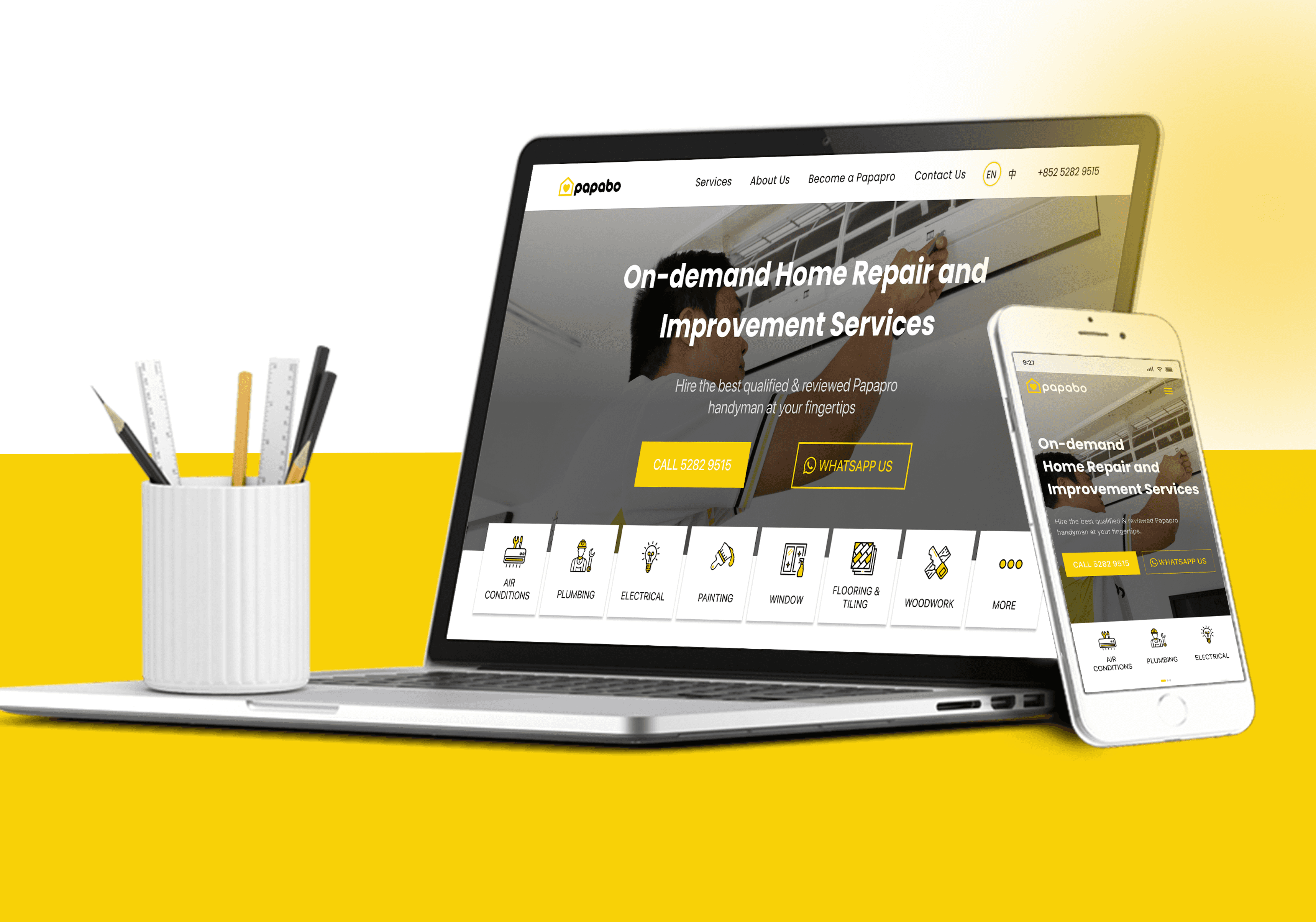
Papabo is a leading home repair and improvement service provider in Hong Kong. Their website had been patched and iterated over time until it stopped working - confusing navigation, no clear information hierarchy, and a UI that no longer reflected the quality of their actual services. I led a full website revamp across four structured phases, rebuilding everything from information architecture to final high-fidelity screens, across desktop and mobile. The result is a fast, responsive, SEO-optimised site with clear CTAs, an updated brand presence, and a chatbot layer that keeps users engaged without requiring human support.
Papabo's services were professional. Their website wasn't - so we rebuilt it from the ground up.
Problem Framing
The Core Problem
The existing Papabo website had three compounding problems. First, the navigation was genuinely confusing - users couldn't find services without hunting. Second, the information hierarchy was flat, so nothing felt more important than anything else, which meant nothing prompted action. Third, the UI looked dated, which directly undercut the professional quality signal Papabo needed to convert first-time visitors into inquiries.
Why it mattered
For a home services business in a competitive market like Hong Kong, the website is the first trust signal. If it looks unreliable, the service feels unreliable - regardless of the actual quality. Every visitor who couldn't find what they needed, or didn't feel confident enough to submit an inquiry, was a lost lead. At Papabo's scale, that's a meaningful revenue problem compounding quietly in the background.
Supporting data / evidence
Research included analysis of existing website performance, customer behavior patterns, competitor analysis across comparable home services platforms, and direct customer feedback. User personas were developed to anchor every subsequent design decision to a real user type rather than assumptions. Content audit identified outdated, unclear copy that was suppressing both user confidence and search visibility.
Role & Team
My Role
I handled the full project scope - research and analysis, information architecture, content strategy, wireframes at low and high fidelity, visual direction, design system, UI and UX design across all breakpoints, and prototype. Every phase from empathise to validate was mine to lead and deliver.
Team Composition
Solo designer. Papabo's internal team provided brand assets, service content, and business context. Stakeholder input shaped the scope and priorities at each phase gate.
Stakeholders & decision-makers
Papabo's product and marketing leadership in Hong Kong. Design decisions at each phase - particularly navigation restructure and visual direction - were reviewed and signed off before moving forward.
Approach
Strategy & framework
The project followed a four-phase process: Empathise, Conceptualise, Design, Validate. That structure wasn't just process housekeeping - it was the right order of operations for a revamp where the existing site had accumulated problems across multiple dimensions simultaneously. Trying to fix the UI before fixing the IA would have produced a prettier version of the same broken experience. Research and architecture came first, visual design followed.
Research methods used
Customer behavior analysis on the existing site. Competitor analysis of home services platforms in the Hong Kong market. Customer feedback review. User persona development across primary customer types. Content audit covering copy clarity, keyword coverage, and information accuracy. Product analysis of the current site against best-practice navigation and hierarchy benchmarks.
Key insight(s)
The navigation wasn't just confusing - it was unsorted. Services existed as a flat list with no grouping logic. The moment I grouped them under meaningful parent categories and built a clear hierarchy, the entire site structure became obvious. That single IA decision cascaded into cleaner page templates, clearer CTAs, and a mobile experience that actually worked. Most of the UI problems were downstream of the architecture problem.
Challenges
Primary challenge
Revamping a site that was still live and actively serving customers, without a clean brief for what the new version should be. Papabo had gone through multiple iterations already - which meant there were accumulated assumptions baked into the existing structure that weren't always visible until I tried to remove them. Some service groupings that seemed arbitrary turned out to reflect real operational distinctions that couldn't just be redesigned away.
How I navigated it
I ran the research phase before touching any layout decisions. Understanding why the existing structure looked the way it did - even when it wasn't working - prevented me from redesigning problems into the new version. Wireframes were validated against user personas before moving to high-fidelity, which caught navigation assumptions early rather than during prototype testing.
What I Did differently
I'd schedule a usability testing session on the low-fidelity wireframes specifically for the service category groupings. That's the decision with the most downstream impact on the whole site, and testing it at wireframe stage - before any visual design investment - would give faster, cleaner signal than testing it at prototype stage.
Solution
What I designed
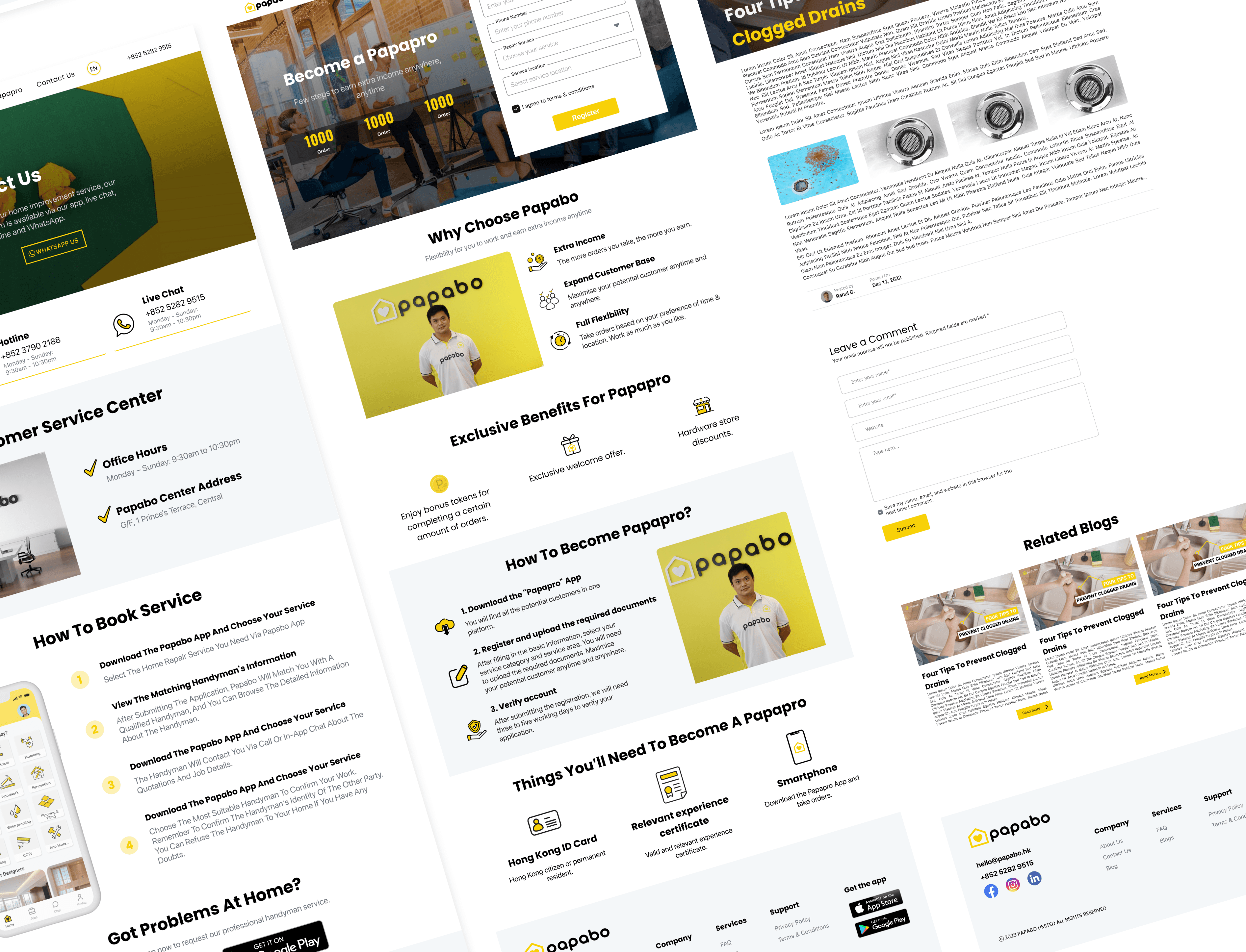
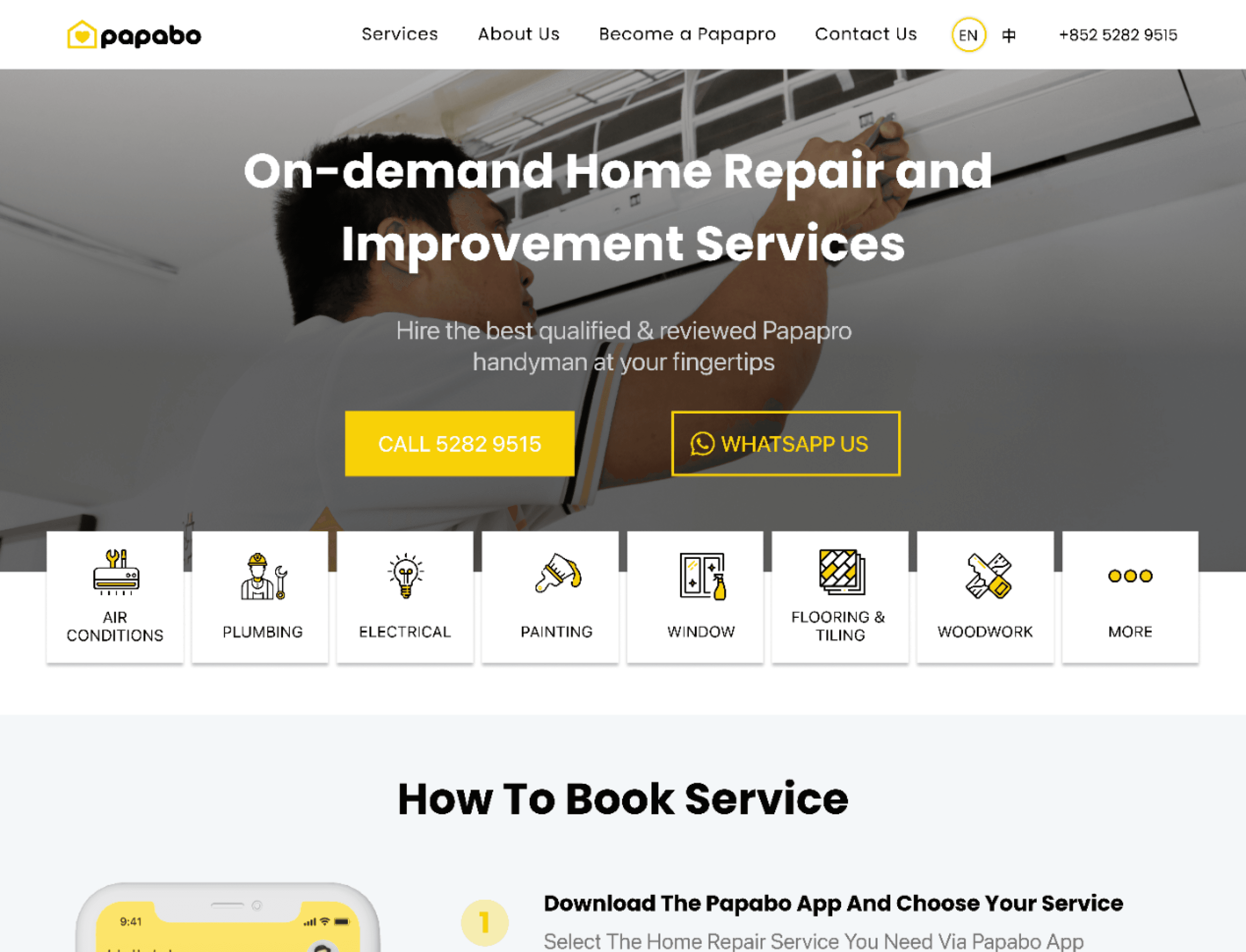
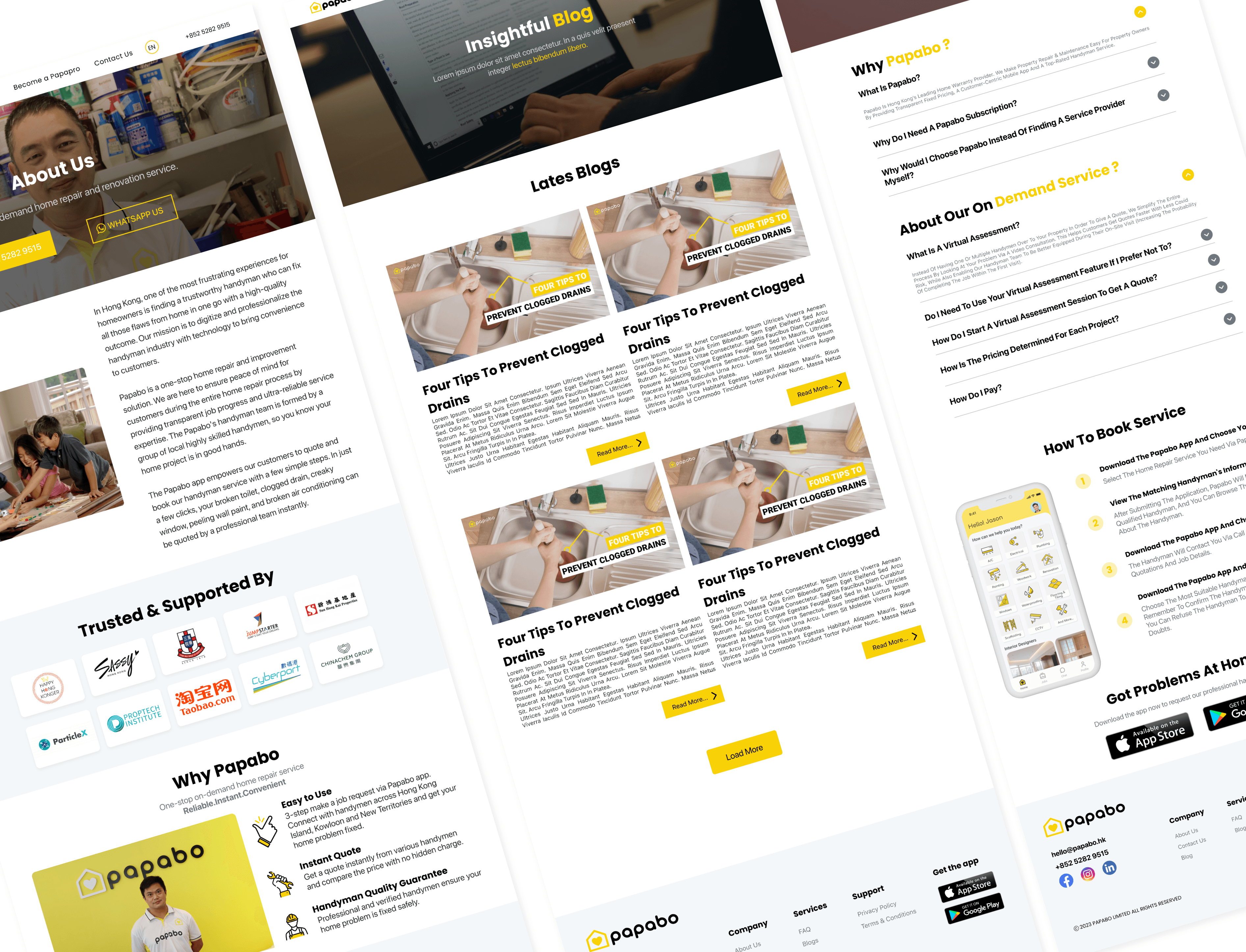
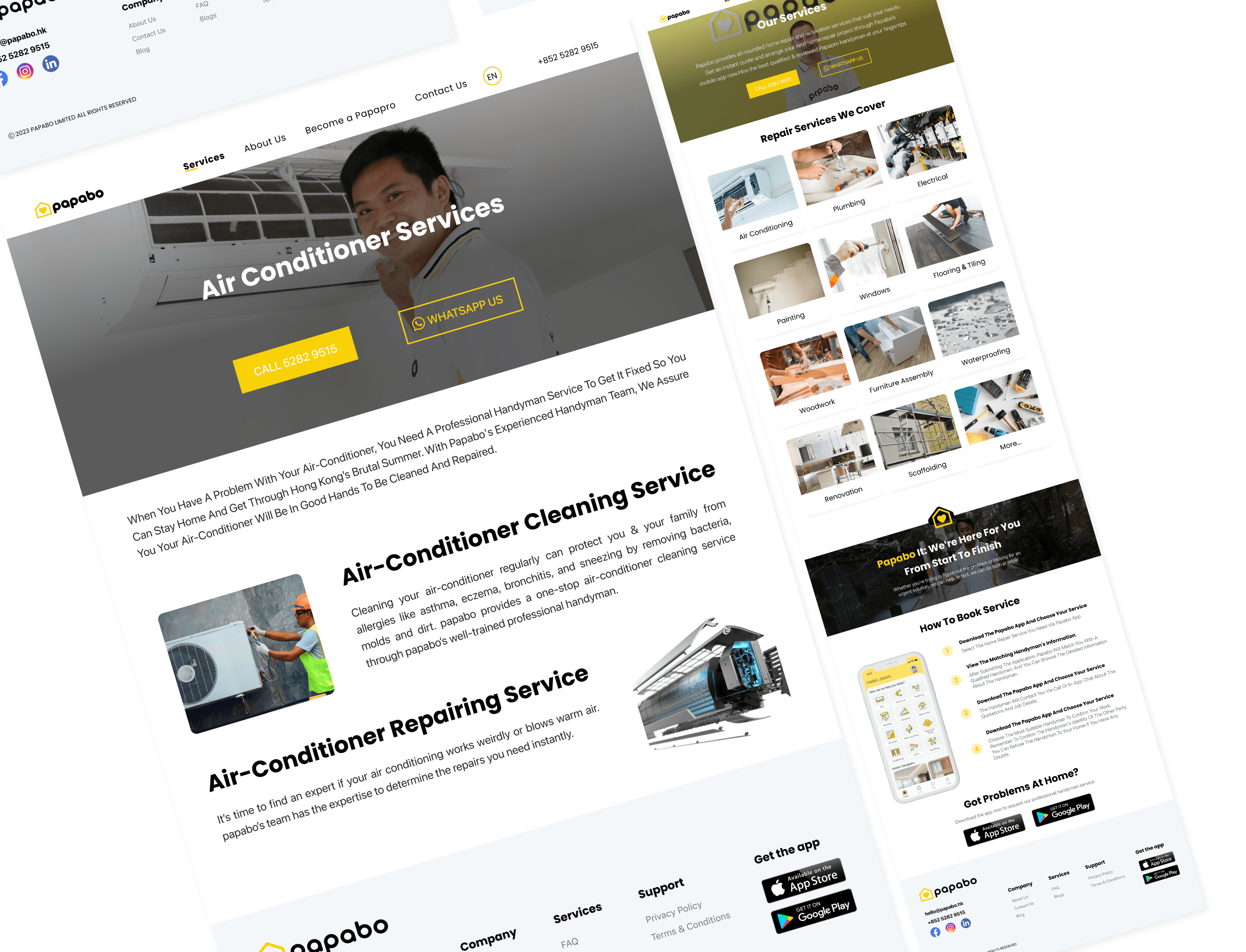
A fully revamped responsive website across desktop and mobile, covering the complete Papabo service offering. New information architecture with services grouped under clear parent categories. Redesigned navigation with a simplified menu structure and clear CTAs on every page. A modern UI built on Papabo's brand colors - yellow (#F8D107) and black - with Poppins and SF Pro as the typographic system. UX improvements including optimised load speed, full responsiveness, accessibility improvements, and an integrated chatbot. SEO-optimised content throughout.
Key design decisions
1. Service grouping as the structural foundation. Reorganising services under parent categories wasn't a cosmetic decision — it was the core architectural change that made everything else work. Once services had a logical hierarchy, the navigation simplified, the page templates became consistent, and the CTAs had somewhere clear to point. 2. Yellow and black as a conversion tool, not just branding. Papabo's brand colors are high-contrast by nature. I used that to direct attention — yellow on black for primary CTAs, black on white for content, yellow accents for hierarchy. The color system did the visual weight work so the layout didn't have to. 3. Chatbot as a low-friction inquiry path. A significant portion of home services visitors have a question before they're ready to submit a formal inquiry. The chatbot gives those users somewhere to go — which keeps them on the site and moves them toward conversion without requiring a human on the other end.

Results & Impact
Quantitative results
Full website revamp delivered across desktop and mobile breakpoints. Services reorganised into a clear, categorised hierarchy. All pages equipped with direct CTAs. Site optimised for search engines with updated meta structure and keyword-aligned content. Accessibility improved across images and screen reader compatibility.
Qualitative outcomes
The new information architecture resolved the core navigation complaint that appeared consistently across customer feedback - users can now find services without hunting. The updated UI reflects the professional standard of Papabo's actual service quality, closing the trust gap between first visit and inquiry. The chatbot addition introduced a new engagement layer that handles common pre-inquiry questions without pulling in human support.
Business impact
Papabo now has a website that does what a home services site in a competitive market needs to do - build trust fast, make services findable, and give visitors a clear next step on every page. The SEO work improves organic visibility, which compounds over time. The chatbot reduces support burden while increasing conversion opportunities from visitors who previously had no low-friction path to engagement.
Next Steps
What's next (and why)
Post-launch, the most valuable data will come from the pages where users are still dropping off before inquiry. The new CTA structure creates a clear funnel - which means the gaps in that funnel will be much easier to identify and fix than they were before the revamp. A/B testing the primary CTA copy on the homepage and top service pages would be the first thing I'd run.
Open questions / hypotheses
Does the chatbot reduce or increase formal inquiry submission rates? There's a version of this where it resolves questions and converts users faster - and a version where it satisfies curiosity without pushing toward action. That distinction matters and should be tracked from day one.
Learnings
This project confirmed something I keep running into on revamp work - the visual problems are almost never the real problems. Papabo's site looked outdated, but the actual failure was structural. Fixing the hierarchy fixed the experience. The new UI just made it visible. On any revamp, I'd now insist on an IA audit before opening a design file.