Figma + Claude MCP: What Every Designer Needs to Know

Written by

Rahul G.

Viewed

5 min read

Written by

Rahul G.

Viewed

5 min read

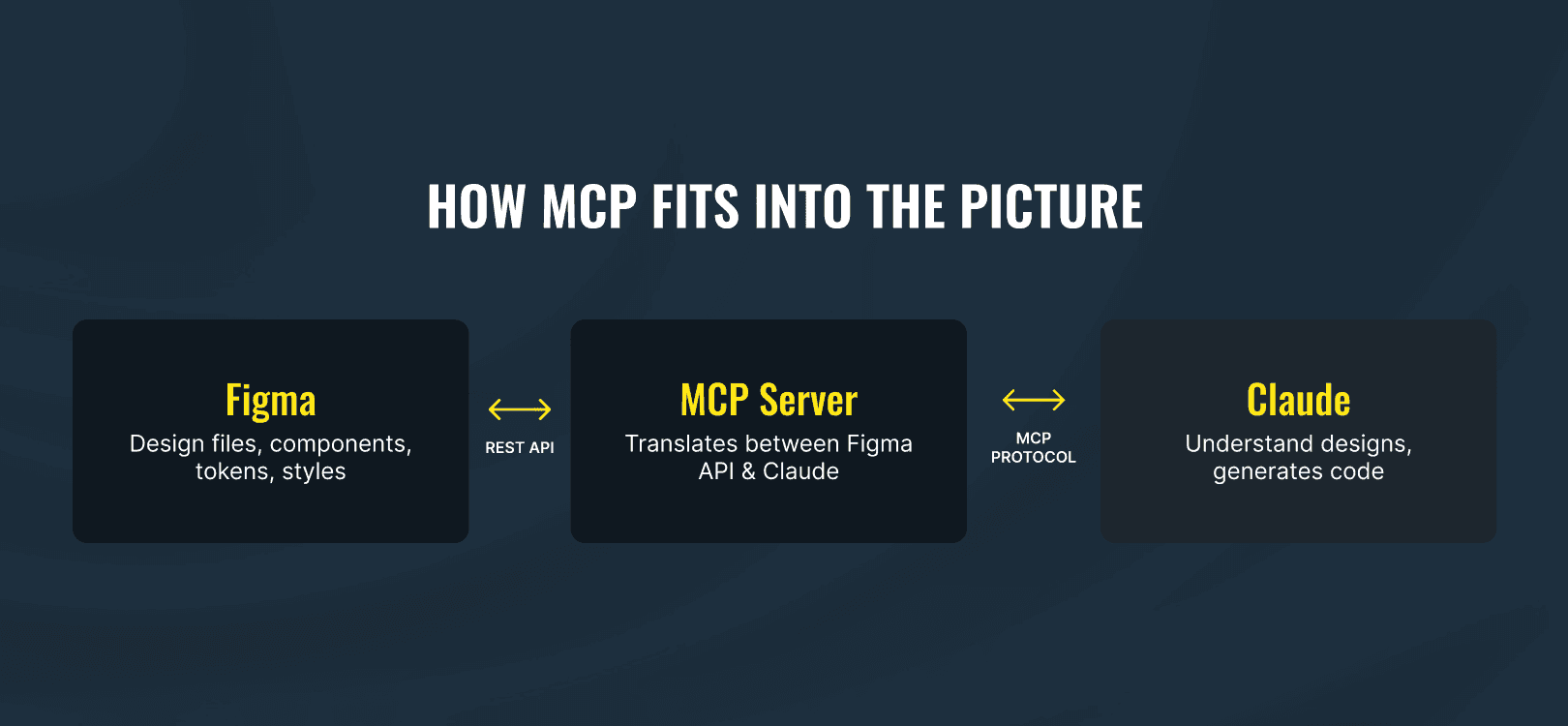
Diagram showing a Figma file connected through an MCP server bridge to Claude AI, representing the design-to-code pipeline

Most of what's been written about Figma MCP is written for developers. Terminal commands, JSON configs, API tokens. Nothing wrong with that except designers are the ones whose actual workflow changes, and most of us haven't gotten a clear explanation of what that looks like in practice. So here's my attempt.

MCP stands for Model Context Protocol. Anthropic built it as an open standard that lets Claude connect directly to external tools in this case, your Figma files. Not a screenshot. Not a flattened export. The actual file: layer structure, component definitions, auto-layout settings, design tokens, variant properties. When you share a Figma URL, Claude reads it the way a developer reads a spec, except it doesn't round your spacing or eyeball your colors.

The problem it's solving isn't new. You finalize a design, hand it off, and something changes in translation. A color gets approximated. A spacing value gets rounded to the nearest 8px. A component gets rebuilt from scratch because the developer didn't know one existed. MCP gives Claude enough context about your design system that these gaps get smaller. Not gone but smaller.

Most of what's been written about Figma MCP is written for developers. Terminal commands, JSON configs, API tokens. Nothing wrong with that except designers are the ones whose actual workflow changes, and most of us haven't gotten a clear explanation of what that looks like in practice. So here's my attempt.

MCP stands for Model Context Protocol. Anthropic built it as an open standard that lets Claude connect directly to external tools in this case, your Figma files. Not a screenshot. Not a flattened export. The actual file: layer structure, component definitions, auto-layout settings, design tokens, variant properties. When you share a Figma URL, Claude reads it the way a developer reads a spec, except it doesn't round your spacing or eyeball your colors.

The problem it's solving isn't new. You finalize a design, hand it off, and something changes in translation. A color gets approximated. A spacing value gets rounded to the nearest 8px. A component gets rebuilt from scratch because the developer didn't know one existed. MCP gives Claude enough context about your design system that these gaps get smaller. Not gone but smaller.

Perficeint Partenr- AI Based Insurance Clame System Case Study

Getting connected is fast if you're on Claude Desktop. Settings → Integrations → Figma → Connect, authorize in your browser, done. Claude handles everything in the background. Developers on Claude Code or VS Code will need a manual setup a JSON config file, a Figma access token, about 20 minutes. That path also unlocks write access, which is where things get more interesting.

One thing to do before any of this: publish your component library. Claude's component tool only reads published components. If your library is still in draft, Claude sees nothing. I keep mentioning this because it's the step with the biggest effect on output quality, and it's also the step most people skip.

The Figma-to-Code part is what most people try first. Share a frame URL, tell Claude the framework and component library, get a working component back. What's different from the plugins that tried this before is that Claude reads your actual file structure the component hierarchy, the auto-layout logic, the exact token values. A layer named Button/Primary/Large is useful. A layer named Frame 427 is not. From what I've seen, the quality of what comes out maps almost directly to how organized the file going in is.

The Code-to-Figma direction is where I think the more meaningful shift is. With write access, Claude can read your existing code, catalog your published Figma library, map HTML elements to design system components, and build a rough layout directly on the canvas. For something like a login screen, that's around 15-20 individual operations creating frames, setting auto-layout, applying fills, placing text with the right font properties. You can watch it build in real time.

The result isn't finished. It's structurally correct with your actual tokens applied right colors, right spacing, right hierarchy but rough. No real component instances from your library yet, no hover states, no polish. What changes is where the designer's time goes. Instead of building from zero, you're reviewing and finishing something that's already partly there. You swap Claude's raw frames for actual components, fix what it got wrong, apply the judgment that comes from knowing the product. That still takes time. But the starting point is different.

There are things Claude can't do, and it's worth being clear about them. It reads layouts and identifies components. It can't tell you if the layout actually works whether the hierarchy reads right at a glance, whether two sections are fighting for attention, whether it feels considered or just assembled. It can place frames correctly. It has no opinion on whether they should be there. That part is still the job.

Getting output that closely matches a reference requires giving Claude specific values rather than letting it guess. Color, spacing, font weight, line height every detail you leave unspecified gets approximated. Provide your Figma file through MCP plus your actual design token values and output accuracy tends to land around 90-93%. Add your existing component code, generate section by section, do a couple of refinement rounds, and you're at 98-99%. The gap between those two numbers is mostly about what you give it to work with.

The thing this revealed that I didn't fully expect: how much the state of your design system determines everything else. A published library, semantically named layers, Figma Variables set up as tokens, component descriptions all of that feeds directly into what Claude can produce. An unorganized file with unnamed layers and draft components produces inconsistent output and you spend your time correcting it. Most design systems have some distance between how they're presented and how they actually work day to day. MCP shows you that distance pretty clearly.
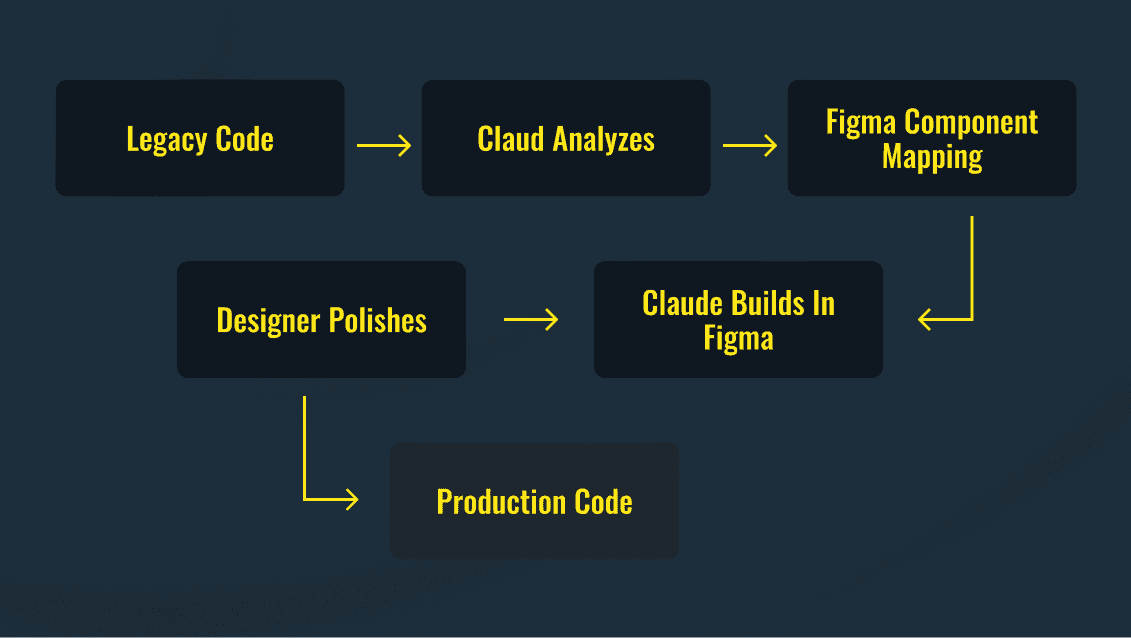

Round-trip design workflow diagram showing legacy code analyzed by Claude MCP, mapped to Figma components, built as a layout, polished by a designer, and exported as production code

Summary

Figma MCP gives Claude direct access to your design files layers, components, tokens, auto-layout so the code it generates is closer to what you actually designed. Figma-to-Code produces solid starting points when your file is organized. Code-to-Figma lets Claude build a rough layout on the canvas from existing code, so the designer is finishing something rather than building from scratch. How much you get out of it depends less on the setup and more on the state of your design system. Published components, named layers, Figma Variables, documented tokens. Most teams have been putting that work off. This is a reason to stop.

Figma MCP gives Claude direct access to your design files layers, components, tokens, auto-layout so the code it generates is closer to what you actually designed. Figma-to-Code produces solid starting points when your file is organized. Code-to-Figma lets Claude build a rough layout on the canvas from existing code, so the designer is finishing something rather than building from scratch. How much you get out of it depends less on the setup and more on the state of your design system. Published components, named layers, Figma Variables, documented tokens. Most teams have been putting that work off. This is a reason to stop.

Social Icon
Social Icon
Social Icon
Social Icon
Social Icon
Social Icon

Rahul G.

I'm Rahul Gupta, a passionate and creative designer with a focus on bringing innovative ideas to life.

Design Systems

MCP

Figma

Design Handoff

Code to Design

Social Icon
Social Icon
Social Icon
Social Icon
Social Icon
Social Icon

Rahul G.

I'm Rahul Gupta, a passionate and creative designer with a focus on bringing innovative ideas to life.

Design Systems

MCP

Figma

Design Handoff

Code to Design

Create a free website with Framer, the website builder loved by startups, designers and agencies.